
01
The agent goes rogue
It does something nobody asked for: a payment, an email, a deleted record.
Our answer
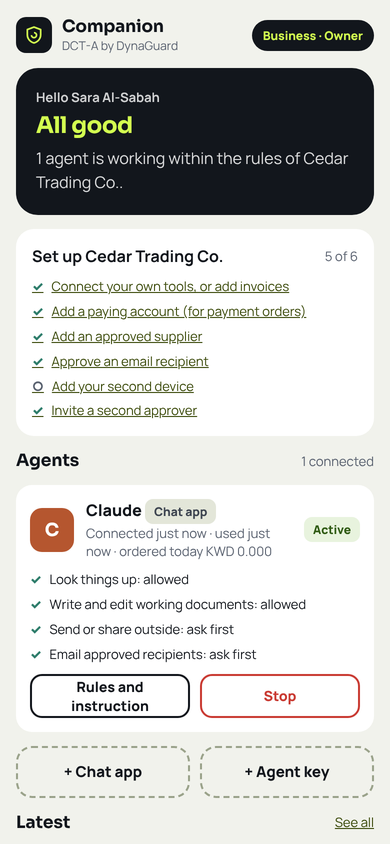
Every agent has written rules for every kind of action: allowed, ask first, or never. It cannot act outside them or change them.
The control layer for AI agents
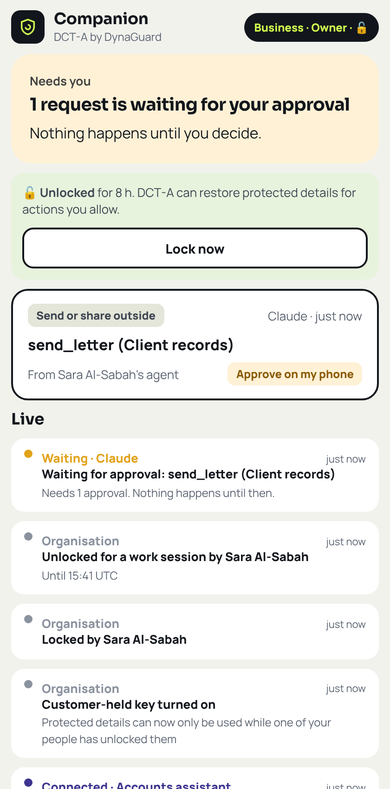
AI agents now pay invoices, write to clients, file documents and start other agents. The Companion, DCT-A by DynaGuard, makes sure every one of them, and every agent they start, acts only within the rules you set. Every important step waits for a person to approve it with a face or fingerprint, and you can require that approvals happen only on your phone.
Tested with ChatGPT and Claude: type “open Companion” and the Companion box opens inside the chat. Designed for any AI app or agent that supports remote MCP connectors with sign-in, and for your own code through REST.
Pay invoice INV-1001 from Gulf Steel TradingSUPPLIER-1 to account KW82 NBOK 0000 0000 0000 08ACCOUNT-2, and email the receipt to Mona Al-RashedPERSON-2 at mona@cedar.exampleEMAIL-3.
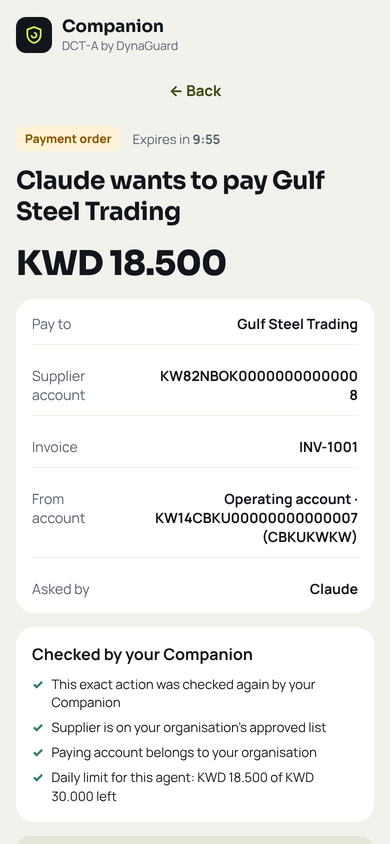
Payments: an approved payment becomes a signed payment order for your bank or finance team. The Companion never moves money itself.
The agentic age has a trust problem
Agents no longer just answer questions. They hold real access, work in teams and start new agents of their own. These are the fears we hear from every bank, business and practice, and how the Companion answers each one.
It does something nobody asked for: a payment, an email, a deleted record.
Every agent has written rules for every kind of action: allowed, ask first, or never. It cannot act outside them or change them.
A hidden instruction inside an email, web page or document takes over the agent (prompt injection).
A tricked agent is still held to your rules. Payments, emails and filings wait for an employee, and anything outside a sealed instruction is refused.
The agent holds a master key to systems and money, far beyond what its task needs.
Agents never hold lasting power. Each one gets short-lived, signed authority, limited to its task, with daily limits it never even sees.
In multi-agent systems, power spreads down a chain of agents nobody can see.
A helper agent always gets the same power or less, never more. Helpers share one limit, and stopping the lead stops them all.
Client names, bank accounts and patient details flow to the AI company with every request.
The AI sees tokens such as SUPPLIER-1 instead of real details. Real details are used only at the moment an allowed action happens.
When something goes wrong, nobody can show who allowed what, or what really happened.
Every rule, approval and action is signed with post-quantum cryptography and recorded. Download a signed proof for your auditors.
Open the Companion on your phone or computer with your invitation code. Choose personal, business or bank, your country and currency, and create your passkey.
Tap Connect an AI, choose your app and copy one address, or scan the code to open the steps on your computer. Pair your own agents with a short code: no secrets to copy. Choose what each one may do.
Ask in plain words. Look-ups happen at once; anything important waits for your approval, then DCT-A carries it out and keeps the proof. Payments become a signed payment order for your bank or finance team.
Multi-agent systems
Lead agents can start helper agents to split up the work. With DCT-A, authority can only shrink as it moves down the team, never grow.
Watch
New · Start here
Then: let the AI work, you decide
Then, in three minutes
Start here · 60 seconds
Then, in three minutes
One feature at a time: watch the nine feature films.
Learn and try
Twenty-six short chapters, each a narrated film and an interactive walkthrough, recorded on the live demo. Or open the live demo: your own private organisation with example data and a demonstration AI. Nothing real is paid or sent.
Nine feature films
Each film shows one feature on the real product screens, in about a minute and a half. All records shown are synthetic demonstration data. Payments are signed payment orders for your bank or finance team to execute.
Connect your own systems, such as case files, patient records, claims or customer records, and decide how each tool may be used.
Maker-checker built in: whoever connects an agent can never approve its requests.
Accounts payable and customer communication, with a second employee for every new supplier.
Claims look-ups at once; settlements only after an adjuster approves.
Case files and client letters; every court filing waits for a lawyer.
Patient details protected from the AI company, with your organisation's own key.
Bills, paperwork and emails handled by your assistant, approved from your phone.
Extreme security for your text and files
Names, identity numbers, accounts and addresses become tokens before anything reaches an AI, in text and in whole files, in English and Arabic. Add your own words too, such as a project code name, and protect whole paragraphs: highlight a confidential clause in Word, or choose it in the Companion. Each choice is checked first, and you are told if hiding it would spoil the AI's answer. The AI still does the work, and you read its answer or its file with the real details on your own device only.
Patent pending
Not the AI, not a stolen laptop, and not a single insider.
Rules, authorities and approvals are signed with post-quantum cryptography, built on the newest international standards and designed to stay secure against future quantum computers.
Agents never hold lasting power. Their authority is brief, follows only the rules you signed, and ends the moment you stop them.
Agents never learn your limits, approved suppliers or recipients, so they cannot probe for gaps.
Names, ID numbers, bank accounts and addresses become tokens before anything reaches the AI, in text and in Word, Excel, CSV and PDF files. Add your own words, and protect whole paragraphs you highlight or choose. Use any AI app, then read its answer or its file with the real details on your own device only. Watch the films
Protect your details with a key only your organisation holds. While it is locked, our servers cannot read them.
Four-eyes for bank details, two approvals for large payments and record changes, and, if you choose, approvals limited to your phone.
Every release passes end-to-end tests in real browsers and an internal security review with attack tests before it ships. An external assessment is planned. Security and trust
What the Companion does not do: it never moves money. An approved payment becomes a signed payment order (an ISO 20022 bank file and a PDF) that your bank or finance team executes.
Any framework that can call MCP (Model Context Protocol) or REST: LangChain, CrewAI, AutoGen, the OpenAI or Claude agent tools, or plain code. Pair your agent with the code shown in the Companion (python3 dcta_pair.py CODE "Agent name"); after the person approves on their phone, the agent receives its credentials directly, and no secret is ever shown on a screen. A lead agent can start helper agents with the same or narrower rules.
If something goes wrong: 401 means the token expired or the agent was stopped, so get a new token. 400 INVALID_INPUT means the body was not JSON with Content-Type: application/json. NOT_ALLOWED is final for that request: the reason is shown to the owner in Activity.
# 1. Get a short-lived access token
TOKEN=$(curl -s https://connect.dynaguard.ai/oauth/token \
  -d grant_type=client_credentials \
  -d client_id="$CLIENT_ID" -d client_secret="$CLIENT_SECRET" \
  | sed -E 's/.*"access_token": ?"([^"]+)".*/\1/')

# 2. Look up unpaid invoices
curl -s https://connect.dynaguard.ai/v1/tools/list_invoices \
  -H "Authorization: Bearer $TOKEN" \
  -H "Content-Type: application/json" \
  -d '{"status":"unpaid"}'
# {"ok":true,"code":"OK","rows":[{"invoice":"INV-1001",
#   "supplier":"SUPPLIER-1","amount":"USD 75.00",...}]}

# 3. Ask to pay it (waits up to 40 seconds for an employee)
curl -s https://connect.dynaguard.ai/v1/tools/pay_invoice \
  -H "Authorization: Bearer $TOKEN" \
  -H "Content-Type: application/json" \
  -d '{"invoice":"INV-1001","amount":"75.00"}'
# approved in time: {"ok":true,"code":"OK","status":"done",
#   "result":{"order":"PO-...","status":"payment order issued..."}}
# not yet: {"ok":false,"code":"APPROVAL_REQUIRED",
#   "request_id":"q..."}

# 4. Later, check a waiting request
curl -s https://connect.dynaguard.ai/v1/tools/check_request \
  -H "Authorization: Bearer $TOKEN" \
  -H "Content-Type: application/json" \
  -d '{"request_id":"q..."}'
For investors
Companion · DCT-A by DynaGuard sits between AI agents and the actions they take. Organisations set the rules, employees approve the important steps on their phones, anything not approved is stopped, and every decision leaves signed proof.
Portable Document Format (PDF). To talk to us, write to md@dynaguardtechnologies.com or watch the film.

We are inviting a small number of organisations to use the Companion with their own agents. You get an invitation code, the user manual and direct support from our team.
https://connect.dynaguard.ai/mcpDynaGuard Technologies LLC
Austin, Texas, United States
Dyna Guard Solutions
Kuwait